
Withdraw
Send NEAR from your trading account to your own wallet with no wallet popup, take everything out in one signature, or send to another NEAR account, and what stays behind.
You can take NEAR out of your trading account at any time. A withdrawal to your own wallet needs no wallet popup, because it pays only your owner wallet. Every other destination needs your owner wallet’s signature. This page covers NEAR on NEAR; Withdraw to another network covers the rest.
Before you start
Section titled “Before you start”- Trading is unlocked on this device. The drawer’s buttons stay off while it’s locked. See Trading shows Locked.
- Your owner wallet is the wallet you signed in with. With a NEAR wallet it’s that NEAR account. With an EVM wallet, a Solana wallet or a passkey, NEAR goes to your NEAR Intents balance, which the drawer calls My NEAR Intents balance.
- 0.05 NEAR always stays. The account keeps it to stay open, and the drawer says how much stays under the amount.
Withdraw to your wallet
Section titled “Withdraw to your wallet”-
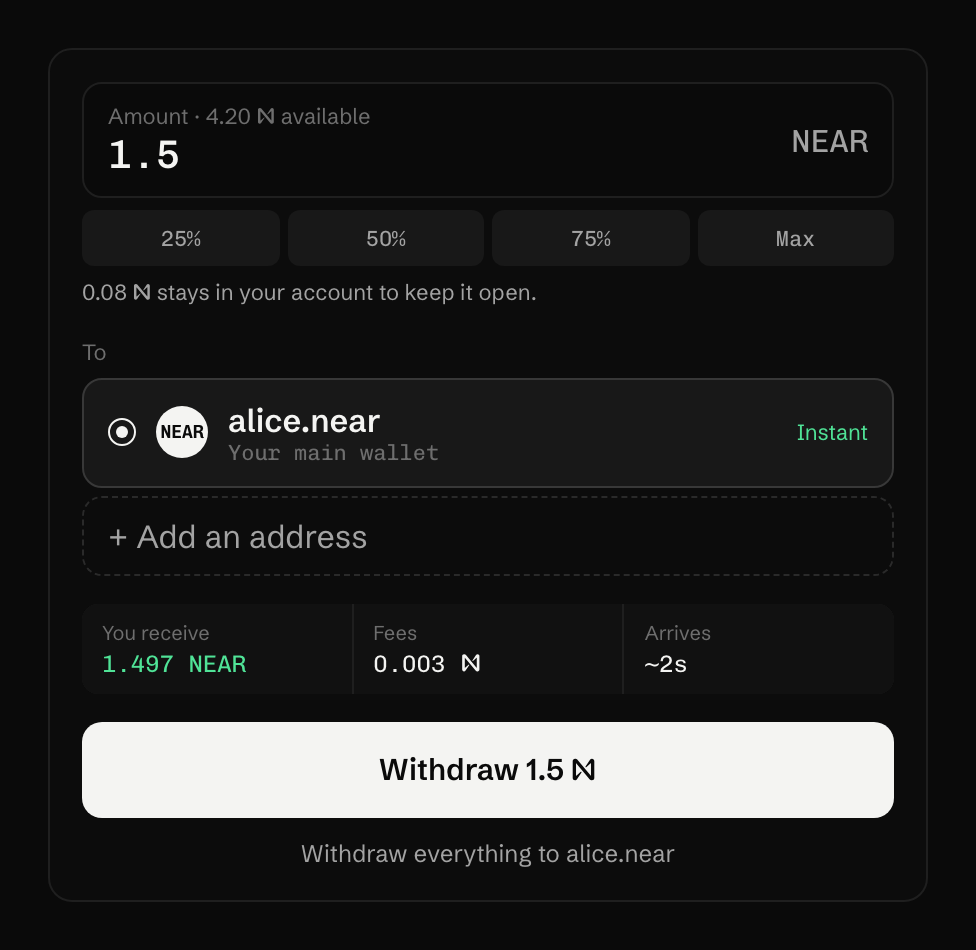
Open the account menu and choose Withdraw. The drawer opens on its Withdraw tab.
-
Under To, pick your wallet: the row with your NEAR account’s name, Your main wallet under it and the tag Instant. Other sign-ins pick My NEAR Intents balance.
-
Type an amount, or pick 25% 50% 75% Max. The field’s label says how much is available.
-
Read You receive, Fees and Arrives, then press Withdraw 1.5 N (the button repeats your amount). With a NEAR Intents balance it reads Send 1.5 N to NEAR Intents.
The trading key signs and sends the transaction itself. The account checks the 0.05 NEAR reserve, then transfers the NEAR to your owner wallet. If part of your balance is wNEAR, the app sends the native NEAR first and the wNEAR in a second transaction, which the account unwraps, so your wallet receives plain NEAR.
Withdraw everything
Section titled “Withdraw everything”Under the button, Withdraw everything to and your account’s name empties the account in one signature from your owner wallet: all wNEAR as plain NEAR, then the NEAR above what the account needs for its own storage. The account stays open. Other sign-ins see Send everything to my NEAR Intents balance.
Another NEAR account
Section titled “Another NEAR account”If you signed in with an EVM wallet, a Solana wallet or a passkey, pick Another NEAR account (Instant, confirmed with your sign-in), type the account where it says “NEAR account, e.g. alice.near”, and press Send 1.5 N. Your sign-in signs the send, and the account checks that signature before anything moves.
If you signed in with a NEAR wallet, withdraw to your wallet first and send from there.
What you should see
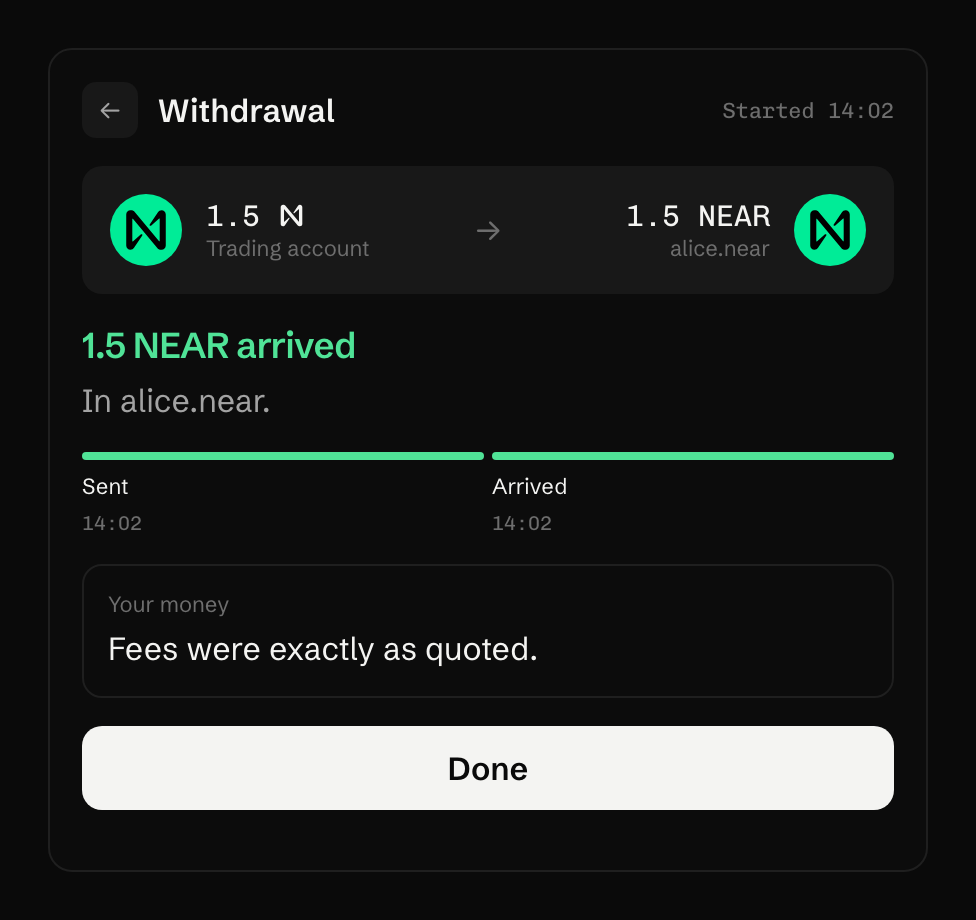
Section titled “What you should see”The drawer turns into a card with two steps, Sent and Arrived:
Under the amount, before you send:
While 24/7 orders are stored, a line under the amount also says how much NEAR is kept for their gas.
If it does not work
Section titled “If it does not work”- The button says You can withdraw up to an amount, or Nothing to withdraw right now. Part of the balance has to stay. Withdraw won’t send everything says what holds it and how to free it.
- The card says “Withdrawal didn’t go through”. The card names the reason and says the NEAR is back in your trading account. Press Try again.
- The buttons are off and trading shows Locked. See Trading shows Locked.
What it costs
Section titled “What it costs”A withdrawal on NEAR pays only network gas, from your trading account. The drawer shows it as Fees 0.003 N. There is no trading fee on a withdrawal. See Fees and costs.
Last verified 15 October 2026 against R4.