
Buy a token
Buy a token from its trade ticket: amounts, slippage presets, what Route & fees shows, the price notices and the toast that follows the trade.
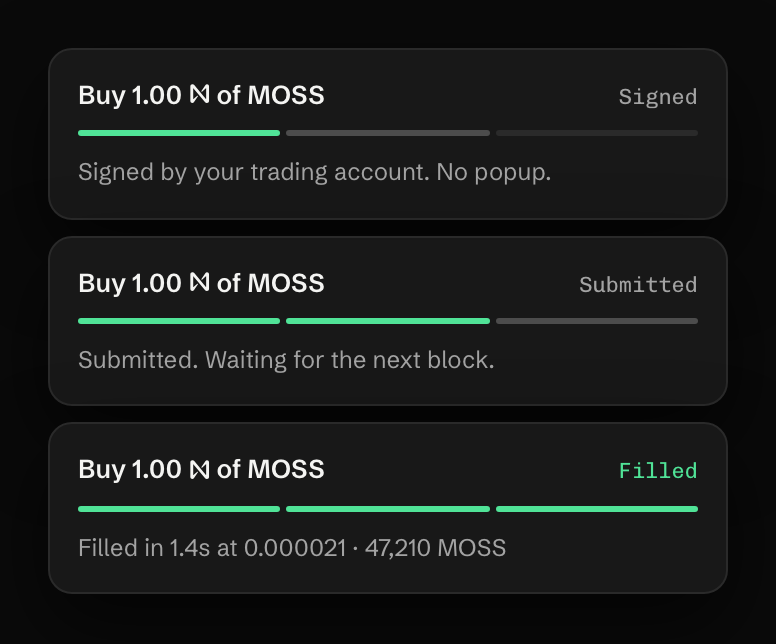
Every token page has a trade ticket on the right. A market buy takes one press: your trading account signs it in the background, so there’s no wallet pop-up, and the toast in the corner follows it to the fill.
Before you start
Section titled “Before you start”You need plain NEAR in your trading account. The ticket shows how much you can spend as N available. That figure is lower than your balance by about 0.4 NEAR: the ticket keeps the reserve, the fee and the gas for selling this token later free, so the account has the NEAR to sell the position later.
Buy at market
Section titled “Buy at market”-
Open a token from Discover, Trenches or the search, and keep the ticket on Buy and Market.
-
Type an amount in NEAR or press a quick amount: 1 5 10 25 on a computer, 0.5 2 5 25 on a phone. The pencil next to them (Edit quick amounts) lets you set your own.
-
Read You receive ≈ under the amount. It is the quote: about how many tokens this amount buys right now.
-
Open Route & fees if you want the detail. It lists the expected amount, your slippage, the price impact, the pool fee, how far the price sits from the market price, and Fees (0.75% + gas). A token with a transfer tax shows it here too.
-
Press Buy followed by the token’s symbol, for example Buy MOSS.
The toast then walks through the trade:
Slippage and presets
Section titled “Slippage and presets”Slippage is how far below the quote you accept to be filled. The gear in the ticket switches between three presets, and the top bar shows the active one, for example P2 · 10% · Default.
| Preset | Name | Slippage at most |
|---|---|---|
| P1 | Quiet | 5% |
| P2 | Default | 10% |
| P3 | Launch | 20% |
On Auto, a pool route is signed at 4%, or at the preset’s cap when the cap is lower. A custom value can be anything from 0.01% to 50%. Your trading account signs the resulting minimum, and the pool refuses to fill below it.
Notices before a buy
Section titled “Notices before a buy”The ticket warns in amber and lets you go ahead when a buy costs noticeably more than the market price, or when the route uses a pool with a high fee:

Above a larger gap, the press asks first, with Edit order and Send anyway. Token checks (holders, dev, snipers, tax and the rest) sit on the token page as information. They never stop a trade.
If it doesn’t fill
Section titled “If it doesn’t fill”- The price moved past your slippage. Nothing is bought and no fee is charged. The toast offers a retry at the next step up (5, 10, 15, then 20%). See Price moved past your slippage.
- It expired. “The network did not include it within 60 seconds, so it expired. No NEAR left your account.” Press Resend to try again.
- Not enough NEAR. The button reads Not enough NEAR · Deposit, or Not enough NEAR · Convert to NEAR when your wNEAR would cover it. See Not enough NEAR for fees.
What it costs
Section titled “What it costs”The fee is 0.75% of the NEAR that goes into the swap, and only when the trade fills. Network gas is about 0.003 NEAR on a Rhea pool and up to about 0.006 NEAR on a launchpad curve; the ticket shows its estimate as Network fee ≈. Fees and costs has the arithmetic.
Last verified 15 October 2026 against R4.