
Add funds
Deposit NEAR from your wallet, from any wallet or exchange, or from another network through NEAR Intents, and read the deposit card until the funds are available.
Open the account menu and choose Deposit. Which rows you see depends on how you signed in:
| Signed in with | Ways to deposit NEAR |
|---|---|
| A NEAR wallet | From your wallet · Any wallet or exchange · Solana · BNB Chain · HyperCore |
| An EVM wallet, a Solana wallet or a passkey | Any wallet or exchange · Solana · BNB Chain · HyperCore |
Other crypto (USDC, ETH, SOL, BTC and more) goes through the same screen: pick the token, then its network. Everything that isn’t NEAR on NEAR is converted to NEAR by NEAR Intents on the way in.
From your wallet
Section titled “From your wallet”The row carries your wallet’s name. Enter the amount; the form shows what arrives, a network fee of 0.003 N and an arrival time of about 2 seconds. Press Deposit from followed by your wallet, and confirm in the wallet. The card goes Signed, Confirmed, Ready and ends with “… NEAR is in your trading account”.
OKX Wallet can’t send this deposit from inside UNRLZD. The app says so and shows your account’s address to send to instead.
If the wallet reports an error after the transfer went out, the card shows “Checking your deposit” and reads your wallet’s own transactions until it finds the transfer or its absence. NEAR deposit shows Unconfirmed covers that case.
From any wallet or exchange
Section titled “From any wallet or exchange”Choose Any wallet or exchange and Copy address. Send NEAR on the NEAR network to that address. The app’s note: “From any NEAR wallet or exchange. Arrives in seconds, no conversion.” The screen’s own heading says it: “Send only NEAR on NEAR to”.
From another network
Section titled “From another network”-
Pick the network, or the token and then its network. For NEAR, the rows are Solana, BNB Chain and HyperCore.
-
Read the card from the top. Most networks need no amount: the card says “Send at least” and the minimum, then shows a deposit address. HyperCore needs the exact amount the card shows, and lists its costs in dollars under Conversion & spread and If refunded before you send.
-
Send from your wallet on that network, to that address only. Add the memo or tag if the card asks for one: without it, the funds can’t be matched.
-
Press I’ve sent it. “We detect it automatically, so you can close this page.”
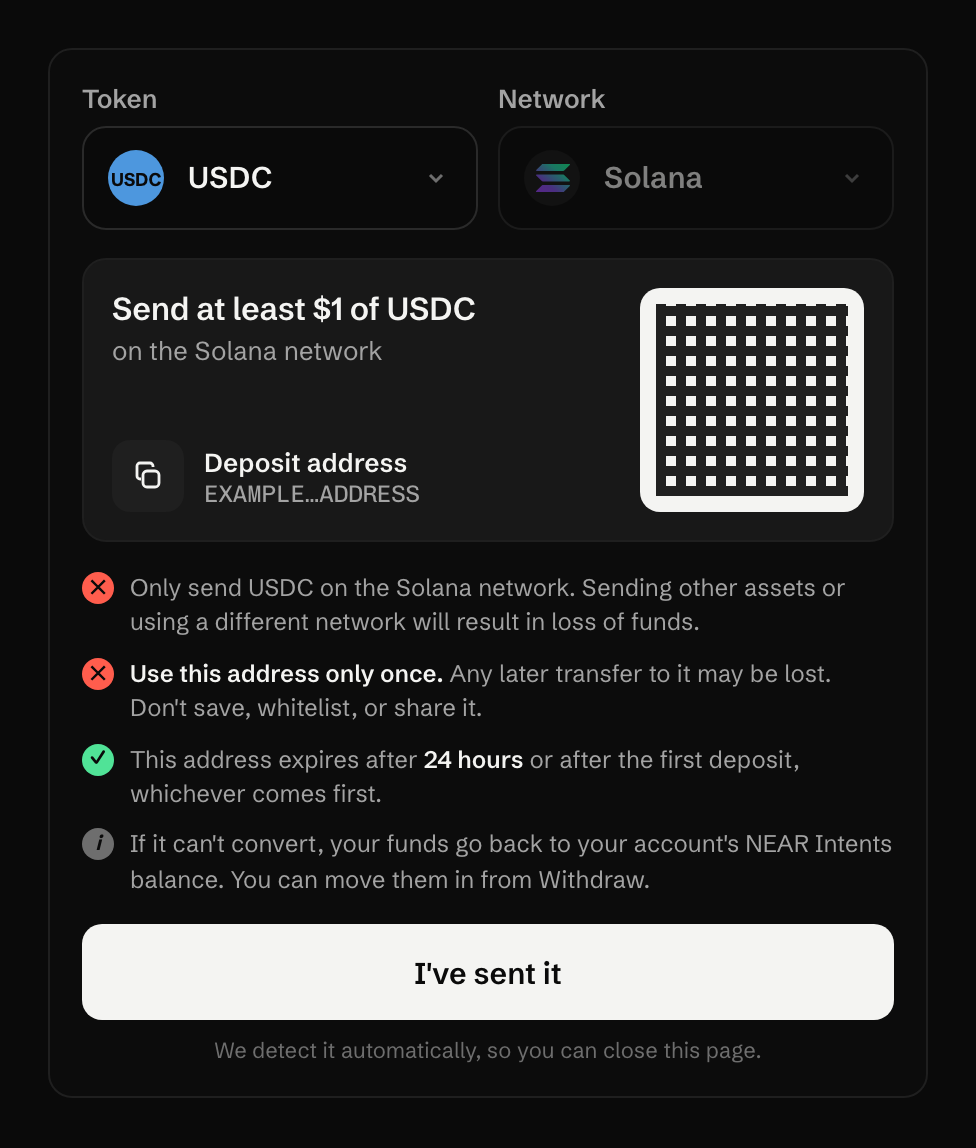
The card then shows Confirming on the network, Converting to NEAR, and Funds available. A network that runs slow gets a line saying so.
If it can’t convert
Section titled “If it can’t convert”The funds are returned, and the card says where they went:
- Most deposits go back to your trading account’s NEAR Intents balance. Move them in from Withdraw, or from the card’s Move into your trading account.
- NEAR sent from BNB Chain goes back to the NEAR Intents balance of your wallet, which you can reach at near.com.
- With an EVM wallet, a HyperCore deposit goes back to your own address on HyperCore.
Deposit from another network is slow or returned walks through each card state.
What it costs
Section titled “What it costs”A deposit from your wallet costs the network fee, 0.003 NEAR. From another network, UNRLZD adds no fee; NEAR Intents takes its conversion fee and the spread out of what you send. The exact-amount card shows them in dollars before you send; on the others, the amount that arrives is what is left.
Last verified 15 October 2026 against R4.